START WITH YOUR QUESTION
What is the orange-room rap trend? Hotel Lobby AI explained
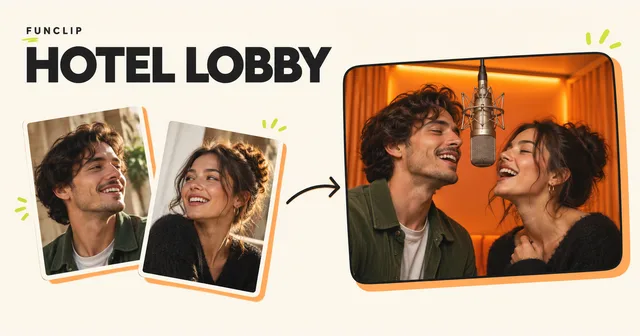
Both names describe the two-person orange-studio video trend. On RapVideo they lead to this same tool: two photos become a newly generated duet, not a hotel-design image or an artist-endorsed product.
RapVideo does not offer free trials or signup credits. Video generation requires a paid credit pack. Watch the public examples before purchasing. Generate my video
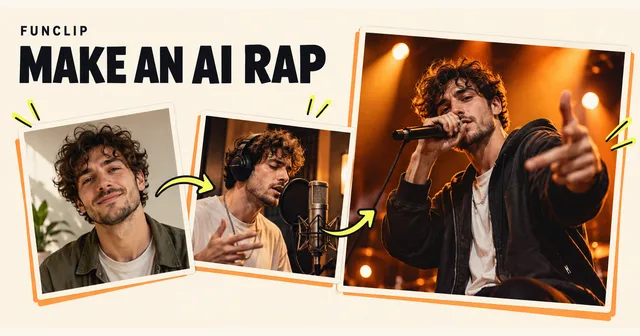
Those videos of two people rapping in an orange room are often called the Hotel Lobby AI trend. The scene comes from Quavo and Takeoff's "Hotel Lobby" performance for A COLORS SHOW, with two performers beside a hanging microphone. RapVideo uses your photos to create a new performance of you and a friend. You can request a new English rap theme in the fixed orange studio. Sound and lip-sync can vary; the tool does not supply the original recording or artist voices.
The orange room makes the reference easy to recognise. The people you put inside it make the clip personal. You might want a duet with a friend, a birthday message or a short anniversary gift. Before picking a tool, decide whether you want a familiar-looking stage or an exact recreation of the original recording. Those are different requests.
Where the orange room comes from
In an October 2026 interview with the Associated Press, Quavo discussed the renewed interest in the 2022 performance and AI versions featuring different people and characters. That establishes the connection between the performance and the current format; it does not tell you how well any particular generator will reproduce your face.
The recognisable scene is quite spare: an orange wall and floor, two performers and a suspended microphone. A steady, wide composition gives each person room to perform and react. If you add a busy hotel interior, constant camera changes or a solo close-up, you may get an entertaining video, but the visual reference becomes less direct.
RapVideo's orange stage uses that simple composition. RapVideo is independent of the artists and COLORS.
People also search for this format as “Migos AI video” or a “COLORS-style AI video”. These names describe the same orange-stage duet here; they do not identify separate RapVideo tools or an official artist partnership.
Decide what you want to keep
A "Hotel Lobby" label can hide quite different workflows. Compare the output, especially the sound, before paying.
| Approach | What to check |
|---|---|
| Editing an existing clip | Which recording and footage are included, and what permission you have to use them |
| Following a motion reference | Whether the movement is close enough to your reference and whether the two identities remain distinct |
| Generating a new performance from photos | Whether you like the new song, gestures and overall staging |
RapVideo generates a new performance directly from two adult portraits in a fixed orange studio. It does not accept user-uploaded video or music. Exact choreography, lyrics, audio and lip-sync are not guaranteed. RapVideo does not supply the original song or artist voices. Changing the interface language is not a soundtrack-language control.
If your joke depends on one exact line from the original song, listen to the public examples before buying. A newly generated song may not meet that requirement. If the appeal is seeing you and a friend performing together, the photos and your chosen theme are a useful starting point.
Give the duet a reason to exist
A short clip has room for a small idea. Choose one occasion and one detail rather than trying to fit a complete speech into ten seconds. These are suggested inputs, not transcripts of generated samples:
- Birthday rap: "Maya turns 30; friends since college." Use two consenting adults, such as the birthday person and a friend.
- Friends duet: "Our rainy camping trip; still laughing about breakfast." Choose a joke both people would enjoy having shared.
- Anniversary duet: "Five years together; our first trip to Lisbon." A shared memory is more personal than a long list of compliments.
Each link selects the orange stage and the corresponding rap theme. Add your own details in the optional theme field. A topic guides the new rap; it is not an exact-lyrics instruction, and names or details may be pronounced differently or omitted.
AI-generated fictional adults, made with the current generator. These two input photos produced this video. Play with sound; results vary.
Why the two photos matter
Choose a separate, clear portrait for each adult. Keep the face visible, with reasonably even light and enough space around the head and shoulders. You do not need matching backgrounds. You do need to be able to recognise each face at the size you intend to watch the video.
Assign the left and right performers deliberately. If you only have a group photograph, crop it into two individual portraits first. A tiny face enlarged from the edge of a group shot will still contain little detail. The photo guide explains how to choose and crop inputs without treating a sharper preview as a guarantee of likeness.
Review the format before buying a video
Choose clear adult photos you have permission to use. Sign in, confirm the upload and use purchased credits to generate your video. RapVideo does not offer free trials or signup credits. Video generation requires a paid credit pack. Watch the public examples before purchasing.
The current paid flow generates video directly; there is no intermediate still scene to approve. Choose two photos, check their left/right order, select the format and an optional English rap theme, then generate. The orange studio setting is fixed.
Each video is a new generation. Technical failures restore the credits charged for that task once. Replacing a successfully generated result consumes credits. See the one-time pack guide for pack quantities and failure handling.
What you can download
The generator produces a ten-second, 768P MP4 in 9:16 portrait or 16:9 landscape. Sound, exact lyrics and lip-sync are not guaranteed. Watch the whole clip with sound before sending it. Check that both people remain recognisable during movement, that the handoff between them makes sense, and that you like the ending.
Use photos you have permission to use, and present the result as an AI-generated performance. RapVideo's current workflow is for two adults. Examples of pets or fictional characters elsewhere on the internet should not be read as a promise that this workflow supports those inputs.
Ready to make one? Follow the two-photo walkthrough, or choose an occasion and start your duet.