START WITH YOUR QUESTION
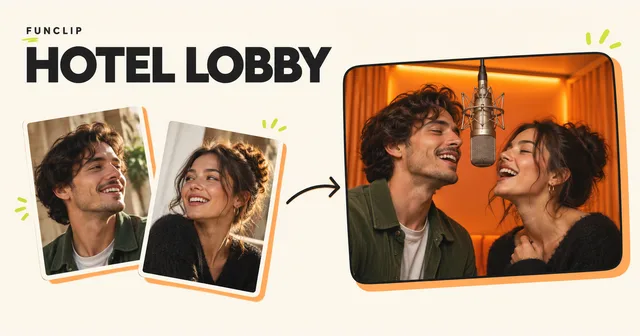
No photo together? Choose photos for a Hotel Lobby video
Use one clear portrait of each consenting adult. You do not need a photo together. Crop a group photo into separate inputs and check the left/right slots before upload.
RapVideo does not offer free trials or signup credits. Video generation requires a paid credit pack. Watch the public examples before purchasing. Generate my video
You can make a Hotel Lobby duet without a photo together: use two separate, clear portraits, one of each consenting adult. If you only have a group photo, crop each person into a separate image. If a face is tiny or blurry, choose a sharper original; enlarging the crop will not recover missing detail. Assign the left and right performers and check the inputs before generating the video directly. These checks cannot guarantee a perfect likeness.
RapVideo accepts JPG, PNG, WebP and HEIC/HEIF photos smaller than 10 MB and at most 40 megapixels. HEIC/HEIF converts to JPEG locally before preview and upload; if conversion fails, export a JPEG from your photo app. Renaming an extension does not convert an image.
Why the two-photo setup matters
A public discussion about making the Hotel Lobby effect explains how easily the setup becomes complicated: the creator distinguishes the left person, right person, close-up and full-body references. The practical question is simple: how does the system know which face belongs to which performer?
In RapVideo, Left performer photo and Right performer photo answer that question explicitly. The video request uses those assignments. If you place the photos in the opposite slots, the intended casting changes. Upload order is worth checking before you pay for an extra version.
Choose the useful photo, not necessarily the favourite photo
Your favourite picture might be a night-out selfie with a hand across the face. For this task, a plain daylight portrait can be more useful. You want to see the eyes, nose, mouth, jaw and hairline without having to guess what is hidden.
Open each photo at a comfortable viewing size. If you cannot clearly see a person's features, enlarging the file will not recreate that missing information. Look for an original camera image instead of a screenshot that has already been compressed several times. A sharp head-and-shoulders photo is a better starting point than a distant full-body shot in which the face occupies only a few pixels.
Avoid strong beauty filters, extreme coloured lighting, oversized sunglasses and hair covering most of the face. These are practical ways to reduce ambiguity, not a scoring system. RapVideo does not currently give your upload a photo-quality score or promise an identity match percentage.
If the only photo you have is a group picture
Crop it into one image per intended performer before uploading. Keep a little space around the head and shoulders. Compare the crop with the original: if the person was very small in the group, the crop may be too soft to help.
Choose a pack by how many videos you want, not how many people appear. Every Hotel Lobby video is built for two adults. The five-video pack lets you generate five separate duets. It does not turn a photograph of five friends into a five-person performance. If your task needs a whole group in one frame, the current template is not the right fit.
For example, imagine a photograph of four friends at dinner. You want the two adults at either end. Make one crop of the leftmost person and a separate crop of the rightmost person, leaving the other faces outside those images. If either crop is blurry, ask that friend for another portrait instead of trying to compensate with the song note. That note guides the rap theme; it cannot restore details missing from a photo.
Give the two inputs a fair chance to work together
You do not need identical backgrounds, cameras or outfits. Two independently taken portraits can work. When you have a choice, use photos with similarly clear faces and reasonably even light. One very dark profile beside a bright front-facing portrait gives you a harder pair to evaluate.
The video generator uses the two people and their outfits as references for your orange studio. It may infer body details that are outside the source photos. A face close-up therefore cannot guarantee an exact full-body outfit. Avoid promising someone a precise uniform, branded garment or jewellery detail based on a photo where it is not visible.
Review the inputs before generating
Check the left and right slots, both faces and the crop. Choose 9:16 or 16:9 format for the orange-studio performance before submitting. The current flow generates video directly, so there is no intermediate still image to approve.
If only one face is unclear, replace that photo and keep the stronger input unchanged. This makes it easier to assess whether the change helped. Repeating the same blurred input may produce a different result, but it does not address the missing source detail. Changing photos, format or theme after a successful video means a new generation and a new credit charge.
Watch both faces throughout the video
Play the whole clip with sound. Watch head turns, hands passing near a face and moments where the two performers overlap. Check the actual output rather than judging only its poster image. Small-image and possible-softness hints help you inspect an input; they are not identity scores or guarantees.
You can crop portraits and swap their positions on the Hotel Lobby page before signing in. Photos upload after you sign in and confirm upload. Check the faces and eyes yourself before confirming.
What if a face, gesture or lip-sync looks wrong?
Replace a blurred or obstructed portrait before paying for another version. Use one simple English rap theme. A good portrait does not guarantee matching mouth movement. RapVideo has no dedicated lip-sync repair control, and exact audio retention or silence is not guaranteed.
A completed clip you dislike is not a technical failure. Another generation uses credits. Technical failures restore the credits charged for that task once. If a task is still pending or its status is uncertain, check the existing task in My clips before submitting again.
RapVideo does not offer free trials or signup credits. Video generation requires a paid credit pack. Watch the public examples before purchasing. See the one-time pack guide for credit costs and video quantities.
A community lip-sync discussion provides examples of the broader problem; it is not a measured test of RapVideo. The practical check is to watch your own finished result before sharing it.